
Pro Filter1.3 - App Store
You'll be able to see results in few seconds.
Publisher Description
[Pro Filter] End of campaign
Thank you for purchasing our product.
[Pro Filter] be ended sale campaign because of server busy.
We sincerely apologize for any inconvenience this has caused you.
GKproject will do the best to provide you a better application.
We look forward to serving you again.
Thank you.
~All application are just free or $0.99 for limited time~
April 29 2013. ~ May 06 2013. Days
iPlan for iPhone $2.99 $0.99
iSave the money $0.99 Free
Cover to Cover $0.99 Free
iPlan for iPad $2.99 $0.99
Pro Filter $0.99 Free
Shot MeMo $0.99 Free
I like files $0.99 Free
Clock Pet $0.99 Free
iAromatherapy $0.99 Free
UFO camera GOLD $2.99 Free
So it s a photo filter app - but what happened to all the filters?
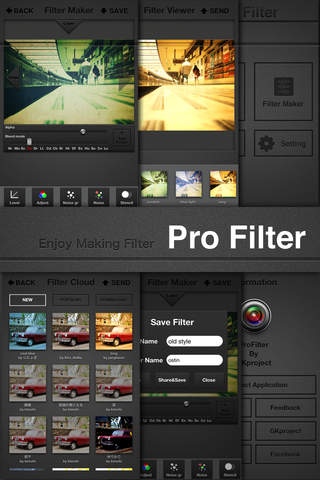
With Pro Filter, users create their own! You can download filters made by people from all around the world and use them to edit your own pictures.
You can also design filters yourself and share them with other users. You've never experienced a filter sharing app like this before.
Take advantage of the app's extensive features as you get to work designing your own filters. Soon, you'll feel like a Photoshop-wielding, photo editing expert.
-------------------------------------------------------
What you can do with Pro Filter
- Layer Mode
This is based on the same layer concept that Adobe Photoshop uses. You never know what kind of radical filters you'll come up with!
- Customize your photo using Add Image Mode
Add to the fun as you add images from your personal library. The more you use, the more creative your filter will become!
- Filter design screen is optimized to make layer mode more efficient
Each section of the design screen has been optimized to assist you as you create your filter.
- Sharing filters among users
Using the filter server, you can share filters you ve designed or browse and download filters made by other users.
- Share your pics on social networks
After you ve applied the filters that you ve created or downloaded, share your pictures through email, Facebook, Flickr, or Twitter.
Features
+18 effects for editing images
Gray
Sepia1
Sepia2
Mosaic
Gaussian
Posteriz
Saturate
Brightbe
Contrast
Gamma
Bias
Level
Adjest
Noise gr
Noise
Stencil
Invert
+16 Photoshop blend modes
Normal
Multiply
Screen
Overlay
Darken
Lighten
Dodge
Burn
Soft light
Hard light
Difference
Exclusion
Hue
Saturation
Color
Luminosity
+Menu for adjusting levels (in increments of .01)
+Add as many layers as you want (we provide 28 basic images, and you can import more from the photo library)
+Undo or redo
If you don t like the way an effect or a blend mode turns out, simply undo it.
-------------------------------------------------------
Does making your own filter still sound too complicated? We ve got you covered. Just take a look at our easy-to-understand in-app tutorial.
Pro Filter will get you making your own filters in no time.
Requires iOS 4.0 or later. Compatible with iPhone, iPad, and iPod touch.
About Pro Filter
The company that develops Pro Filter is imagin. The latest version released by its developer is 1.3.
To install Pro Filter on your iOS device, just click the green Continue To App button above to start the installation process. The app is listed on our website since 2012-03-08 and was downloaded 0 times. We have already checked if the download link is safe, however for your own protection we recommend that you scan the downloaded app with your antivirus. Your antivirus may detect the Pro Filter as malware if the download link is broken.
How to install Pro Filter on your iOS device:
- Click on the Continue To App button on our website. This will redirect you to the App Store.
- Once the Pro Filter is shown in the iTunes listing of your iOS device, you can start its download and installation. Tap on the GET button to the right of the app to start downloading it.
- If you are not logged-in the iOS appstore app, you'll be prompted for your your Apple ID and/or password.
- After Pro Filter is downloaded, you'll see an INSTALL button to the right. Tap on it to start the actual installation of the iOS app.
- Once installation is finished you can tap on the OPEN button to start it. Its icon will also be added to your device home screen.
Program Details
System requirements
Download information
Pricing
Version History
version 1.3
posted on 2012-03-08
Disclaimer
Official App Store Link
We do not host Pro Filter on our servers. We did not scan it for viruses, adware, spyware or other type of malware. This app is hosted by Apple and passed their terms and conditions to be listed there. We recommend caution when installing it.
The App Store link for Pro Filter is provided to you by apps112.com without any warranties, representations or guarantees of any kind, so access it at your own risk.
If you have questions regarding this particular app contact the publisher directly. For questions about the functionalities of apps112.com contact us.
